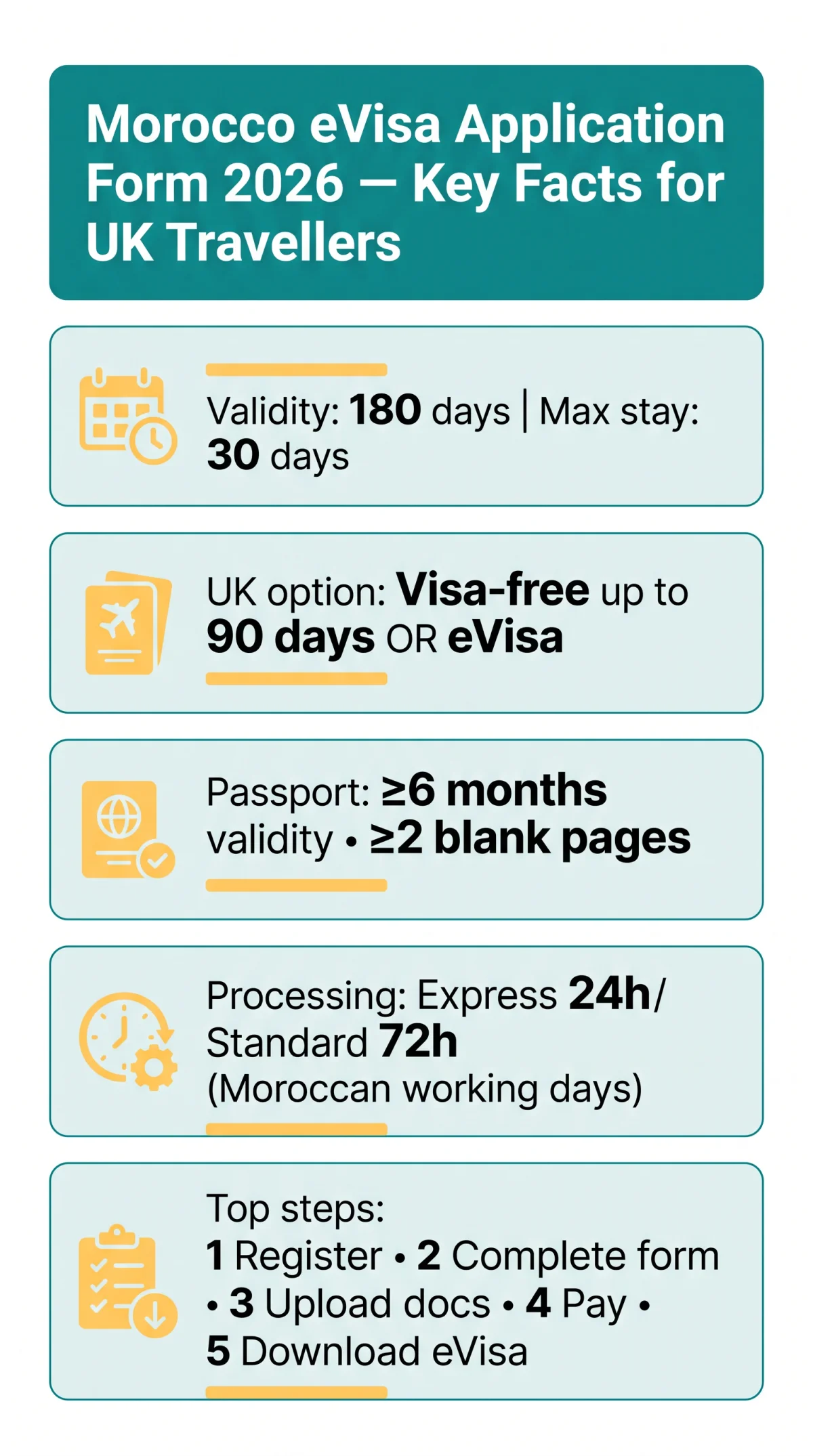
The Morocco eVisa is a single-entry electronic visa valid for 180 days with a 30-day maximum stay, applied for entirely online via the Accès Maroc portal. UK passport holders with at least 6 months’ remaining passport validity can complete the form, upload documents, pay by card, and receive approval by email, typically within 24 hours (express) or 72 hours (standard) of Moroccan working days. No embassy visit is required.
Last updated: 10 September 2026. This is an informational guide only, not affiliated with the Moroccan government. Always verify current requirements on the official Accès Maroc portal before applying.
To fill out the Morocco eVisa application form as a UK traveller in 2026, follow these steps:
Create your account
Register on the Accès Maroc portal with an email address, phone number, and password.
Complete the form
Fill in each section with your passport and travel details.
Upload documents
Upload a passport scan and digital photo.
Pay the fee
Pay the fee by card (Visa, Mastercard, or CMI).
Submit and receive your eVisa
You will receive a confirmation email with your application ID and, upon approval, a downloadable PDF eVisa to carry when you travel.
What Is the Morocco eVisa and Do You Need One?
The Morocco eVisa application form grants a single-entry electronic visa with 180-day validity and a 30-day maximum stay. UK passport holders may enter visa-free for up to 90 days instead.
Launched in July 2022, the eVisa is processed entirely online. The visa is extendable once in-country for an additional 30 days (60 days total maximum) via the local Préfecture de Police, subject to approval.
Travellers from 65+ nationalities, including the UK, can enter Morocco visa-free for up to 90 days. The Morocco eVisa application form remains available as an alternative for shorter stays. A separate eTA pathway exists for certain nationalities: it carries a 90-day validity, allows a 30-day stay, and may require a bank statement covering the last 3 months.
| Fact | Detail |
|---|---|
| Visa type | Single-entry electronic visa |
| Validity | 180 days from date of issuance |
| Maximum stay | 30 days after arrival |
| Application method | 100% online via Accès Maroc portal |
| In-country extension | Once, for 30 additional days (60 days total max) |
| Visa-free entry (UK) | Up to 90 days, no application needed |
Step 0 – Check If You Need an eVisa on the Accès Maroc Portal
Before completing the Morocco eVisa application form, use the Accès Maroc eligibility checker at https:// to confirm whether you need an eVisa or qualify for visa-free entry.
The VERIFIER_ADMISSIBILITE tool (“Do I Need a Visa to Enter Morocco?”) requires all fields to be completed: Nationality, Country of Usual Residence, Document Type (Passport), Event Participation in Morocco, Purpose of Trip, and whether you hold another valid visa. Click “Check” to receive your result.
- UK passport holders are eligible for visa-free 90-day entry OR the eVisa.
- Non-British UK residents may need a supporting residence permit (valid ≥ 180 days) or multiple-entry sticker visa (valid ≥ 90 days, physically stamped in passport).
- eTA pathway applies to certain nationalities with a 90-day validity and 30-day stay.
Only ordinary passports are accepted on the Morocco eVisa application form. Diplomatic, service, special, and travel documents are excluded.
Step 1 – Create Your Accès Maroc Account
To access the Morocco eVisa application form, register on the Accès Maroc portal with an email address, phone number, and password, then activate your account via the verification link sent to your inbox.
The portal defaults to French. Switch to English (EN) via the language selector before starting.
- Register your account. Enter your email address, contact phone number (with international code), and a password. Alternatively, use passkey login for faster access without a password, or sign in via Facebook.
- Activate via email. An activation link is sent to your inbox. Check the spam folder if it does not arrive within minutes.
- Recover if needed. Use the “Forgot Password?” option if you lose access.
Common stumbling blocks on the Morocco eVisa application form portal: spam filters blocking the activation email, incorrect phone number format (international code required), and account lockout after multiple failed login attempts.
Step 2 – Fill Out the Morocco eVisa Application Form, Field by Field
The Morocco eVisa application form contains six sections: personal details, passport information, travel purpose, accommodation, document uploads, and declaration. All fields are labelled in French with mandatory fields marked by an asterisk (*).
-
Personal Information –
NATIONALITE→ Nationality: select “ROYAUME-UNI” for UK passport holders.PAYS_RESIDENCE→ Country of Residence.TYPE_PASSEPORT→ Passport Type: must be “ORDINAIRE” (ordinary). All mandatory (*). -
Passport Details – Passport number, issue/expiry dates (≥ 6 months validity from entry, ≥ 2 blank pages).
-
Travel Information –
MOTIF_VOYAGE→ Purpose of Travel (tourism, business, or event).PARTICIPEZ_VOUS_A_UN_EVENEMENT_AU_MAROC→ Are you attending an event in Morocco? (e.g., MEGA HORECA MOROCCO 2026, 1-3 October 2026, Casablanca).DISPOSEZ_VOUS_AUTRE_VISA_VALIDE→ Do you hold another valid Moroccan visa? All mandatory (*). -
Contact in Morocco – Enter your hotel or accommodation address and a local contact number.
-
Document Upload – Upload your passport bio page scan and digital photo (covered in the next section).
-
Declaration – Confirm all information is accurate and digitally submit.
The Morocco eVisa application form uses a French-language interface where the surname field appears before the given name. The portal may not auto-save your progress, so prepare all details before starting and complete the form in a single sitting.
Uploading Documents – Format, Size & Requirements
Incorrect or missing uploads are the number-one reason the Morocco eVisa application form gets rejected. Submit a clear passport bio page scan and a white-background digital photo in PDF, JPEG, or PNG format.

| Document | Requirements | Format |
|---|---|---|
| Passport bio page | Clear scan, all four corners visible, no glare; ordinary passport only | PDF, JPEG, PNG |
| Digital passport-style photo | White background, taken within 6 months, full face | PDF, JPEG, PNG |
| Residence permit / UK Immigration Status Document | Non-British UK residents only; valid ≥ 180 days from application date | PDF, JPEG, PNG |
| Multiple-entry sticker visa | If qualifying via Path B; physically stamped in passport, valid ≥ 90 days | PDF, JPEG, PNG |
| Bank statement | Last 3 months – eTA applicants only | PDF, JPEG, PNG |
| Proof of onward travel | Confirmed flight reservation showing entry and exit from Morocco | PDF, JPEG, PNG |
Common rejection causes on the Morocco eVisa application form: blurry scans, cropped edges, wrong file type, expired documents, and incorrect photo cropping. Prepare all files before starting to avoid session timeouts.
Step 3 – Pay the eVisa Fee and Submit
After reviewing the Morocco eVisa application form, pay the fee by Visa, Mastercard, or CMI card. Express processing takes 24 hours and standard processing takes 72 hours of Moroccan working days. Click Submit and await a confirmation email with your application ID.
| Tier | Processing Time | Fee |
|---|---|---|
| Express | 24 hours (Moroccan working days) | Displayed on portal at time of application |
| Standard | 72 hours (Moroccan working days) | Displayed on portal at time of application |
Accepted payment methods on the Morocco eVisa application form portal: Visa, Mastercard, and CMI (Centre Monétique Interbancaire, for local/regional cards). The exact fee depends on the processing tier selected and the exchange rate at the time of payment. If payment times out, retry but check the portal dashboard first to avoid duplicate submissions.
After You Submit – Confirmation, Tracking & What to Print
After submitting the Morocco eVisa application form, track your status on the Accès Maroc dashboard using your reference number. Once approved, download and print the PDF eVisa to carry alongside your passport at any Moroccan airport, ferry port, or land border.
Receive your Application ID
A payment confirmation and Application ID arrive by email immediately after submission. Save this reference number.
Track your status
Log in to the Accès Maroc portal dashboard and use the status tracker with your reference number.
Download the approved PDF
The approved eVisa is delivered as a PDF attachment to your registered email. If blocked by spam filters, download it directly from the portal dashboard using your reference number.
Print a copy
Print on A4 paper, colour or black-and-white. Carry a physical copy alongside a digital backup on your phone.
Pass border control
Present a valid passport matching the eVisa details (≥ 6 months validity) and the printed or digital eVisa. Accepted at international airports, the Tanger Med ferry port, and land borders.
For travel to Western Sahara, some areas are open to tourists holding a Moroccan visa. Check current travel advisories and permit requirements before departure.
Applying from the UK – What’s Different?
UK passport holders on the Morocco eVisa application form select “ROYAUME-UNI” as nationality and upload a passport scan only. Non-British UK residents must also upload a BRP or UK Immigration Status Document with at least 180 days’ validity from the application date.
| UK Situation | What to Do | Portal Field |
|---|---|---|
| British passport holder | Select nationality and residence as ROYAUME-UNI; no supporting documents needed (visa-free entry for up to 90 days may apply instead) | NATIONALITE / PAYS_RESIDENCE |
| Non-British UK resident | Upload a valid UK Biometric Residence Permit (BRP) or UK Immigration Status Document, valid ≥ 180 days from application date. A UK Share Code (generated via gov.uk/prove-legal-right-to-work) may serve as proof of residence. | Document upload area |
Common UK-specific errors on the Morocco eVisa application form: entering “UK” instead of “ROYAUME-UNI” in the nationality dropdown, and mismatched names between passport and supporting documents.
Common Mistakes to Avoid on the Morocco eVisa Application Form
The most frequent mistakes on the Morocco eVisa application form are passport number typos, name-order mismatches on the French-language interface, blurry document uploads, and selecting the wrong nationality from the dropdown menu.
- Passport number typo – Transposed digits. Fix: double-check every digit against your passport bio page before submitting.
- Name order mismatch – The French interface lists surname before given name. Fix: enter names in the order shown on the form, not in English convention.
- Wrong nationality selected – Dropdown contains French country names. Fix: select “ROYAUME-UNI” for UK passport holders.
- Passport validity under 6 months – Fix: renew your passport before applying if validity is insufficient.
- Blurry or cropped uploads – Fix: re-scan at higher resolution with all four corners visible.
- Incomplete accommodation address – Fix: enter full hotel name, street address, and city in Morocco.
- Payment timeout causing duplicate submissions – Fix: check the portal dashboard before retrying payment.
- Not checking spam folder – Fix: check spam for activation and approval emails.
Morocco eVisa Application Form FAQ
Can I apply for a Morocco eVisa for my child or minor?
Each child needs a separate Morocco eVisa application form. Parents may need a consent letter and birth certificate. Check the Accès Maroc portal for specific requirements based on the child’s nationality.
Can I submit a group or family application from one account?
Each application must be submitted individually. One account can manage multiple applications, but each requires its own form, document uploads, and fee payment. No batch submission feature exists on the Accès Maroc portal.
What if I spot an error after submitting my application?
No edits after submission. Errors require a new Morocco eVisa application form and fee. Contact portal support for specific cases.
Can I extend my Morocco eVisa once I’m in the country?
Yes, the eVisa can be extended once for an additional 30 days (60 days total maximum). Visit the local Préfecture de Police or Sûreté Nationale before your authorised stay expires. Approval is discretionary.
Does the Morocco eVisa work at ferry ports and land borders?
Yes, the eVisa is accepted at international airports, the Tanger Med ferry port for travellers arriving from Spain, and land borders. Carry a printed or digital copy alongside your passport.
How long does the Morocco eVisa take to process for UK applicants?
Express 24 hours / Standard 72 hours, both in Moroccan working days. Apply a few business days before travel to allow for delays.
What passport validity do I need for the Morocco eVisa?
Your passport must be valid for at least 6 months beyond your planned entry date and have at least 2 blank pages for entry and exit stamps.
What payment methods are accepted on the Accès Maroc portal?
Visa, Mastercard, and CMI (Centre Monétique Interbancaire) are accepted. The fee depends on the processing tier and is displayed on the portal at the time of application. GBP conversion depends on the exchange rate at payment.
Do I need travel insurance for the Morocco eVisa application form?
Travel insurance is not required for the Morocco eVisa application form but is strongly recommended. Medical costs abroad can be significant.
Can I save and return to my Morocco eVisa application form later?
The portal may not save your progress if you close the browser. Complete the Morocco eVisa application form in a single sitting. Have your passport scan, digital photo, and travel details ready before you begin.